Introduction
The Dell Inspiron 15 3000 is Dell's entry point into the consumer laptop market — a machine designed to be affordable, reliable, and sufficient for the basic computing tasks that most households need a laptop to handle. At $429, it is among the least expensive Windows laptops available from a major brand, and it carries Dell's reputation for build quality and reliability into the budget segment. The result is a laptop that is genuinely recommended for buyers whose needs are modest and whose budget is real.
This is not a machine for demanding users. It does not offer a premium display, cutting-edge performance, or a slim premium chassis. What it offers is dependable Windows computing for web browsing, document editing, email, video streaming, and basic productivity — tasks it handles without drama for a price that undercuts the competition from a brand with reliable warranty and support infrastructure.
Performance
The Intel Core i5-1135G7 is an 11th-generation Tiger Lake processor — two generations behind Intel's current lineup. Its four cores and 4.2GHz boost clock deliver acceptable performance for light to moderate tasks, with Cinebench R23 single-core scores around 1,400 and multi-core around 5,500. This positions it below current-generation Intel 12th and 13th-gen processors, and noticeably behind AMD Ryzen 6000-series chips at similar prices. For users coming from older laptops (5+ years old), the Inspiron 15 3000 will feel like a meaningful upgrade regardless.
In practice, performance is adequate for its intended use case. Chrome with 8–10 tabs, Microsoft 365 applications, Zoom video calls, and 1080p YouTube playback run smoothly without lag. Running all of these simultaneously begins to stretch the 8GB of RAM, and users who multitask aggressively may encounter slowdowns. The single SODIMM slot is user-accessible, and upgrading to 16GB DDR4 (available for around $30–40) meaningfully improves multitasking headroom.
Video editing, gaming, and other GPU-intensive workloads are outside this machine's practical scope. Intel Iris Xe integrated graphics handles basic photo editing and 1080p video playback well, but sustained creative work is slow and frustrating on this hardware.
Display
The 15.6-inch FHD WVA panel at 1920x1080 resolution delivers adequate sharpness for everyday content at 141 ppi. The WVA (Wide Viewing Angle) technology provides viewing angles comparable to IPS, which is a meaningful improvement over the TN panels found in some competing budget laptops.
At 220 nits of peak brightness, the display is noticeably dim compared to higher-end machines. In a normally lit indoor environment, 220 nits is usable, though not comfortable for extended use at full brightness. In bright rooms or near windows, screen visibility degrades. The anti-glare matte coating helps reduce reflections from ambient light sources, which partially compensates for the low brightness — but in side-by-side comparison with a 300+ nit display, the difference is clear.
Color coverage is limited to approximately 45% NTSC, which translates to adequate but not vibrant color reproduction. For document work, web browsing, and streaming standard dynamic range content, colors appear acceptable. For photo editing or any work where color accuracy matters, this display is unsuitable.
Battery Life
The 54Wh battery is a genuine strength of the Inspiron 15 3000 relative to competing budget laptops. In mixed productivity use, it delivers approximately 7–8 hours of real-world runtime, making it viable for a full school day or workday with moderate usage. Streaming video at 50% brightness extends battery life toward 9 hours. These numbers are competitive with laptops at twice the price.
The included 65W barrel charger is compact and functional, though the continued use of a barrel connector rather than USB-C is a drawback compared to newer designs. Full charging from zero takes approximately 2.5 hours.
Build Quality & Design
The Inspiron 15 3000 is an all-plastic construction — lid, chassis, bottom — which is expected at this price point but means the build quality is more functional than premium. Panel alignment and gap consistency are adequate, and Dell's quality control generally prevents the worst issues (creaking, uneven panels) that plague the cheapest no-name alternatives. The hinge requires two hands to open, which is a minor inconvenience.
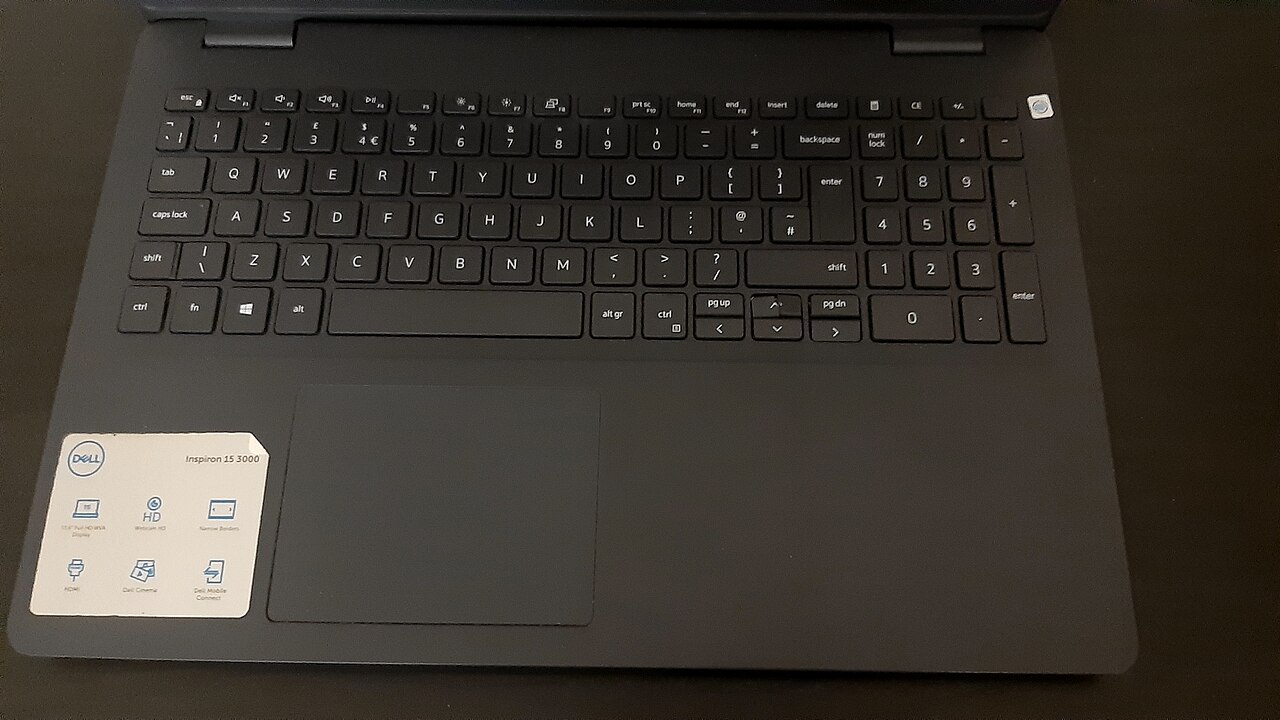
The keyboard is comfortable for extended typing, with adequately sized keys and a numeric keypad that students and office users frequently find useful for data entry. Key travel is approximately 1.5mm, and the tactile response is adequate without being especially satisfying. There is no keyboard backlight, which is a notable absence for users who work in dim environments.
Port selection is functional but dated: two USB-A 3.2 Gen 1 ports, one USB-A 2.0, HDMI 1.4, a full-size SD card reader, and a 3.5mm combo audio jack. There is no USB-C port of any kind, which means USB-C peripherals, external displays, and modern docking stations require specific adapters. This is the most significant design limitation from a connectivity standpoint.
Who Should Buy It?
The Dell Inspiron 15 3000 is the right choice for:
- Families buying a first or secondary laptop for a child's schoolwork
- Seniors or users with basic computing needs (email, web browsing, video calls) who want a reliable brand
- Budget-constrained buyers who need a new laptop and cannot extend to the $550–700 range
- Businesses equipping non-technical employees with workstations for simple document and web tasks
It is not appropriate for users who need performance, portability, quality display, or modern connectivity. The absence of USB-C is a meaningful limitation as the industry standardizes on the format.
Verdict
The Dell Inspiron 15 3000 is the best laptop for buyers whose primary constraint is price and whose computing needs are genuinely modest. It is reliable, comfortable to type on, has above-average battery life for the category, and carries the Dell brand's dependability. The display brightness, processing performance, and connectivity are all below what more expensive machines offer — but for $429, it delivers a fully functional Windows 11 experience that handles everyday tasks without hesitation. Upgrade the RAM to 16GB and manage storage expectations, and it serves its intended audience well.